
AI Tools for Business in 2026: The Complete Guide
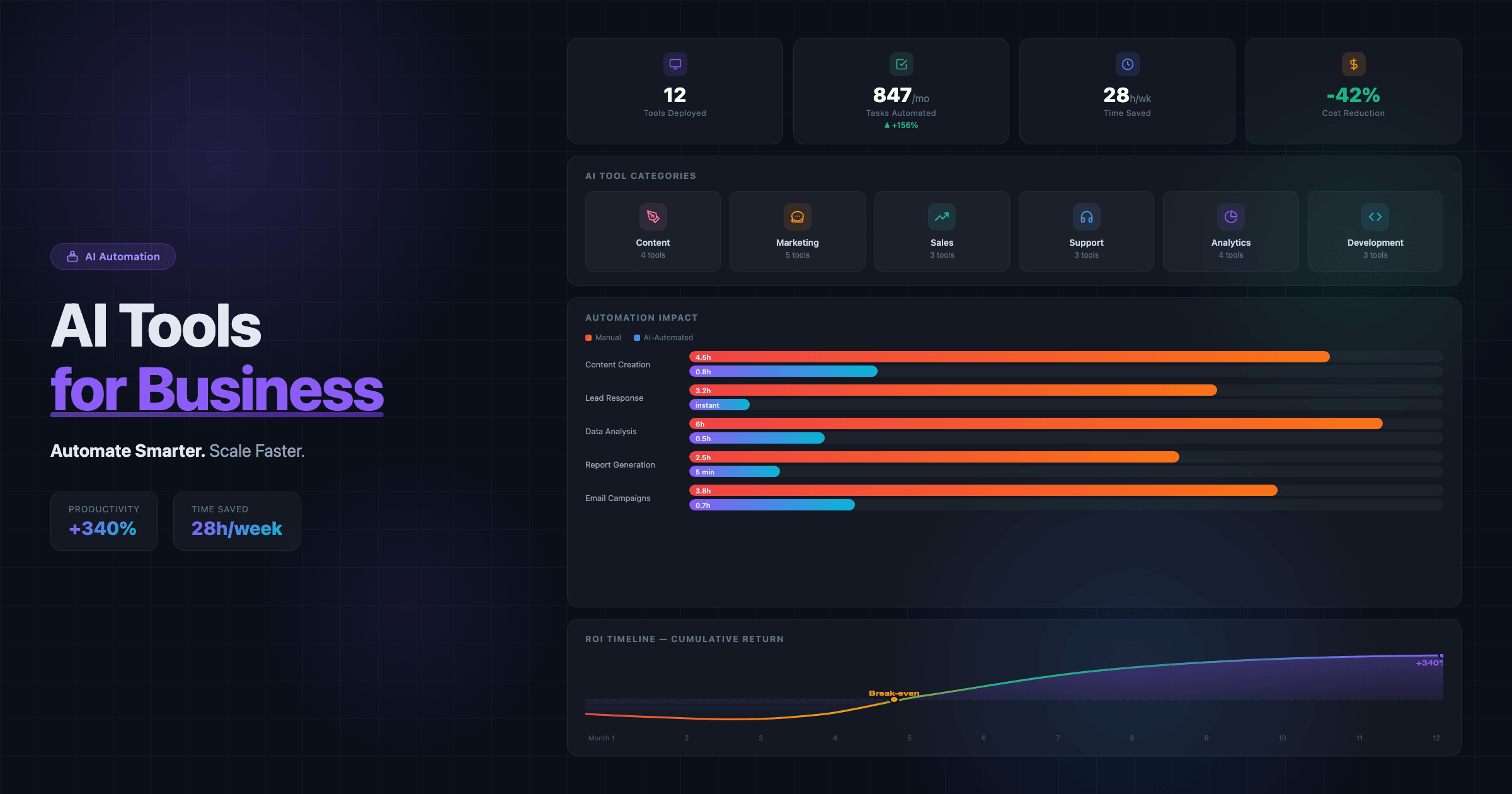
Two years ago, AI tools were a novelty — interesting demos that rarely solved real business problems. In 2026, they’re infrastructure. The businesses using AI aren’t experimenting anymore — they’re automating 40-60% of repetitive work, responding to leads in seconds instead of hours, and producing content at a pace that manual teams simply can’t match.
But the AI tool landscape is overwhelming. There are thousands of options, most of them overhyped, many of them redundant, and a handful that genuinely transform how small businesses operate. The difference between a business that benefits from AI and one that wastes money on subscriptions comes down to choosing the right tools for the right problems.
This guide cuts through the noise. We’ve categorized the AI tools that deliver real ROI for small and medium businesses across six key areas: content creation, marketing, sales, customer support, analytics, and development. No hype — just tools that work, with real use cases and honest assessments of their limitations.
Content Creation: AI That Writes, Designs, and Produces
Content creation is where most businesses first experience AI’s impact. The right tools don’t replace your team — they multiply their output by 3-5x.
Text and Copy
- ChatGPT (OpenAI) — the most versatile AI writing tool. Use it for blog post drafts, email copy, social media captions, product descriptions, and brainstorming. The key: treat it as a first-draft machine, not a publish-ready writer. Human editing and brand voice adaptation are essential. Best for: businesses that produce regular content but lack a dedicated writing team.
- Claude (Anthropic) — excels at longer, more nuanced writing and analysis. Better than ChatGPT for detailed guides, research summaries, and content that requires careful reasoning. Its larger context window makes it ideal for working with long documents. Best for: complex content, technical writing, and deep research tasks.
- Jasper — purpose-built for marketing copy. Templates for ads, landing pages, email sequences, and social posts with brand voice training. More structured than ChatGPT, less flexible. Best for: marketing teams that need consistent brand messaging across channels.
Visual Content
- Midjourney / DALL-E 3 — AI image generation for social media visuals, blog illustrations, ad creatives, and concept mockups. Quality has reached production-ready levels for many use cases. Not for: final brand photography or images requiring pixel-perfect precision.
- Canva AI — AI-powered design features within Canva: background removal, image expansion, text-to-image, and Magic Design for automatic layouts. Perfect for teams without a dedicated designer. The combination of templates + AI makes it the most practical visual tool for small businesses.
Real impact: A small marketing team using ChatGPT for drafts, Canva AI for visuals, and a human editor for quality control can produce 4x more content with the same headcount. The content still needs a strong content marketing strategy behind it — AI accelerates execution, not strategy.
Marketing: AI That Targets, Personalizes, and Optimizes
- Google Performance Max — Google’s AI-driven campaign type that automatically optimizes ads across Search, Display, YouTube, Gmail, and Maps. Feed it your creative assets, budget, and conversion goals — the AI handles targeting, bidding, and placement. Results improve as the algorithm learns. Pair with proper Google Ads budget optimization for maximum ROI.
- Meta Advantage+ — Meta’s equivalent for Facebook and Instagram. AI-powered audience targeting, creative optimization, and budget allocation. Particularly effective for e-commerce and lead generation campaigns.
- Surfer SEO — AI-powered content optimization that analyzes top-ranking pages and provides real-time recommendations for your content: keyword density, headings, content length, NLP terms. Bridges the gap between writing and SEO optimization.
- HubSpot AI — AI features integrated throughout HubSpot’s CRM: predictive lead scoring, email send-time optimization, content recommendations, and conversation intelligence. Best for: businesses already using HubSpot who want to layer AI on existing workflows.
Real impact: AI ad optimization typically reduces cost-per-acquisition by 20-40% compared to manual campaign management. The key is feeding the algorithms enough conversion data — campaigns need at least 30-50 conversions per month for AI optimization to work effectively.
Sales: AI That Qualifies, Follows Up, and Closes
- AI chatbots (Intercom Fin, Drift, Tidio AI) — modern AI chatbots go far beyond scripted responses. They understand context, answer complex questions using your knowledge base, qualify leads by asking the right questions, and hand off to humans when needed. Businesses implementing AI chatbots typically resolve 40-60% of support queries without human involvement.
- Apollo.io / Clay — AI-powered prospecting tools that find, enrich, and prioritize leads. They scrape public data, identify buying signals, and help craft personalized outreach at scale. Critical for B2B businesses that rely on outbound sales.
- Calendly + AI scheduling — AI-powered meeting scheduling that eliminates back-and-forth emails. Smart routing sends leads to the right team member based on qualification criteria. Reduces time-to-meeting by 80%.
Real impact: The biggest win is response time. When a lead fills out your landing page form at 11 PM, an AI chatbot engages them instantly. Studies show that responding within 5 minutes makes you 21x more likely to qualify the lead compared to responding in 30 minutes.
Customer Support: AI That Resolves and Delights
- Zendesk AI / Freshdesk AI — AI ticket routing, auto-responses, sentiment detection, and suggested replies for support agents. The AI learns from your historical tickets to become more accurate over time. Reduces average resolution time by 30-50%.
- ChatGPT Custom GPTs — build custom AI assistants trained on your documentation, FAQs, and product information. Embed them on your website or use internally for team support. Zero coding required — just upload your knowledge base and configure the behavior.
- Voiceflow / Botpress — platforms for building sophisticated AI-powered conversational experiences. More control than off-the-shelf chatbots, with visual builders that don’t require programming. Best for: businesses with complex product lines or support workflows that need tailored AI conversations.
Real impact: AI support doesn’t just reduce costs — it improves customer satisfaction. Customers get instant answers 24/7 instead of waiting hours for a human response. The key is implementing AI for common queries while ensuring seamless escalation to humans for complex issues.
Analytics: AI That Sees What You Miss
- Google Analytics 4 AI insights — GA4’s built-in AI automatically surfaces anomalies, trends, and opportunities you’d miss in manual analysis. It flags unusual traffic spikes, identifies declining pages, and predicts conversion probability for user segments. Learn how to leverage GA4 in our website analytics guide.
- Microsoft Clarity + AI — Clarity now includes Copilot integration that summarizes user behavior patterns in natural language. Instead of watching 50 session recordings, ask the AI “What frustrates users on my pricing page?” and get actionable insights instantly.
- Hotjar AI — AI-generated summaries of heatmap and survey data. Automatically identifies UX problems and prioritizes them by impact. Saves hours of manual analysis per month.
- Looker Studio + Gemini — Google’s BI tool now lets you ask data questions in plain English. “What was our best-performing marketing channel last quarter?” generates the visualization automatically. Democratizes data analysis for non-technical team members.
Real impact: AI analytics doesn’t replace understanding your data — it accelerates finding the insights that matter. A tool that identifies “your mobile bounce rate increased 23% this month because of a slow-loading hero image” saves you hours of investigation and focuses your optimization efforts on what moves the needle. Avoiding common website mistakes becomes much easier when AI flags them automatically.
Development: AI That Builds and Maintains
- GitHub Copilot / Cursor — AI coding assistants that autocomplete code, suggest implementations, explain existing code, and fix bugs. Senior developers report 30-40% productivity gains. Junior developers benefit even more — the AI acts as a real-time tutor. These tools have fundamentally changed how modern web development works.
- v0 by Vercel — describe a UI component in natural language and get production-ready React code. Useful for rapid prototyping and generating component foundations that developers then refine.
- Claude for code review — paste your code and get detailed security analysis, performance suggestions, and best practice recommendations. Catches issues that manual review often misses.
Real impact: AI development tools have reduced the cost and time of web development by 25-40%. This doesn’t mean AI replaces developers — it means experienced developers deliver better results faster. The distinction matters: an AI tool in the hands of an expert produces excellent code. The same tool in the hands of a non-developer produces functional but often insecure, unmaintainable code. This is the same principle behind no-code vs custom development discussions.
How to Choose the Right AI Tools for Your Business
Don’t adopt AI tools because they’re trendy. Use this framework:
- Identify your bottleneck — where does your team spend the most time on repetitive work? That’s where AI delivers the highest ROI.
- Start with one tool per category — don’t subscribe to 15 AI tools simultaneously. Pick your biggest pain point, implement one tool, measure results for 30 days, then expand.
- Calculate the real cost — $20/month for a tool that saves 10 hours of work is a no-brainer. $500/month for a tool that saves 2 hours needs more justification. Always factor in the learning curve and integration time.
- Keep humans in the loop — AI generates, humans verify. AI drafts, humans edit. AI suggests, humans decide. Every AI workflow should have a human quality checkpoint before outputs reach customers.
- Monitor and adjust — track time saved, error rates, and output quality monthly. Kill tools that don’t deliver. Double down on tools that transform your workflow.
Common AI Implementation Mistakes
- Tool overload — subscribing to every AI tool that launches. Each tool requires learning, integration, and maintenance. Start with 2-3 tools that solve your most pressing problems.
- Publishing AI content without review — AI-generated text often contains subtle errors, bland phrasing, and missing context. Every piece of AI content needs human review before publishing.
- Expecting AI to replace strategy — AI tools execute tasks. They don’t develop your social media strategy or decide your brand positioning. Strategy requires human judgment, market understanding, and creative thinking.
- Ignoring data privacy — before feeding customer data into AI tools, understand their data policies. Enterprise plans usually offer better data protection than free tiers. Never input sensitive customer information into public AI interfaces.
- Not measuring ROI — “we use AI” is not a success metric. Track specific outcomes: hours saved, cost reduction, output increase, error decrease. If a tool doesn’t move these numbers within 60 days, reconsider.
How EffectLab Leverages AI for Client Projects
We integrate AI into every stage of our workflow — not as a gimmick, but as a genuine force multiplier. Here’s how:
- AI-assisted development — we use Cursor and GitHub Copilot to accelerate development while maintaining code quality through rigorous human review. This lets us deliver projects faster without sacrificing the custom quality that separates professional development from no-code solutions.
- Automated analytics setup — every site we build includes GA4 with AI insights configured, Microsoft Clarity for behavior analysis, and proper conversion tracking. Our clients get actionable data from day one.
- AI-optimized content architecture — we structure websites for both traditional SEO and AI search engines, with schema markup, FAQ sections, and llms.txt files that maximize AI visibility.
- AI chatbot integration — for clients who need 24/7 customer engagement, we implement intelligent chatbots trained on their specific products and services.
Want to implement AI tools that actually move the needle for your business? Contact us — we’ll assess your current workflows, identify the highest-ROI automation opportunities, and build the technical infrastructure to support them.
Conclusion
AI tools in 2026 aren’t experimental — they’re essential. But the competitive advantage isn’t in having AI tools. It’s in choosing the right ones, implementing them correctly, and keeping humans in control of quality and strategy.
Start with your biggest bottleneck. Pick one tool. Measure results for 30 days. Then expand methodically. The businesses that win with AI aren’t the ones using the most tools — they’re the ones using the right tools for the right problems, with the right human oversight.
The gap between AI-powered businesses and those still doing everything manually is widening every month. Don’t wait for the perfect moment — start automating today, iterate based on results, and build an AI-augmented workflow that makes your team 3-5x more effective.